
Every regular home, on its day, every time.
SparkleCue runs a house cleaning company: every regular customer on their schedule, the visit on the board two weeks ahead, the room checklist on the crew's phone, before and after photos, and the door code, the alarm and the dog's name for the crew on that day only. Price a home by bedrooms and bathrooms in seconds.
The demo opens a sample cleaning company with a guided tour. Try it as the owner, the office, a crew lead, a cleaner, or a customer.
Why SparkleCue
Built for how house cleaning really runs.
Most of the work is the same customers again and again, so the schedule has to run itself. The crew needs the right checklist and the way in, and the customer wants to see the job was done. These are real screens from the demo.
Recurring cleanings
Every regular customer, on schedule.
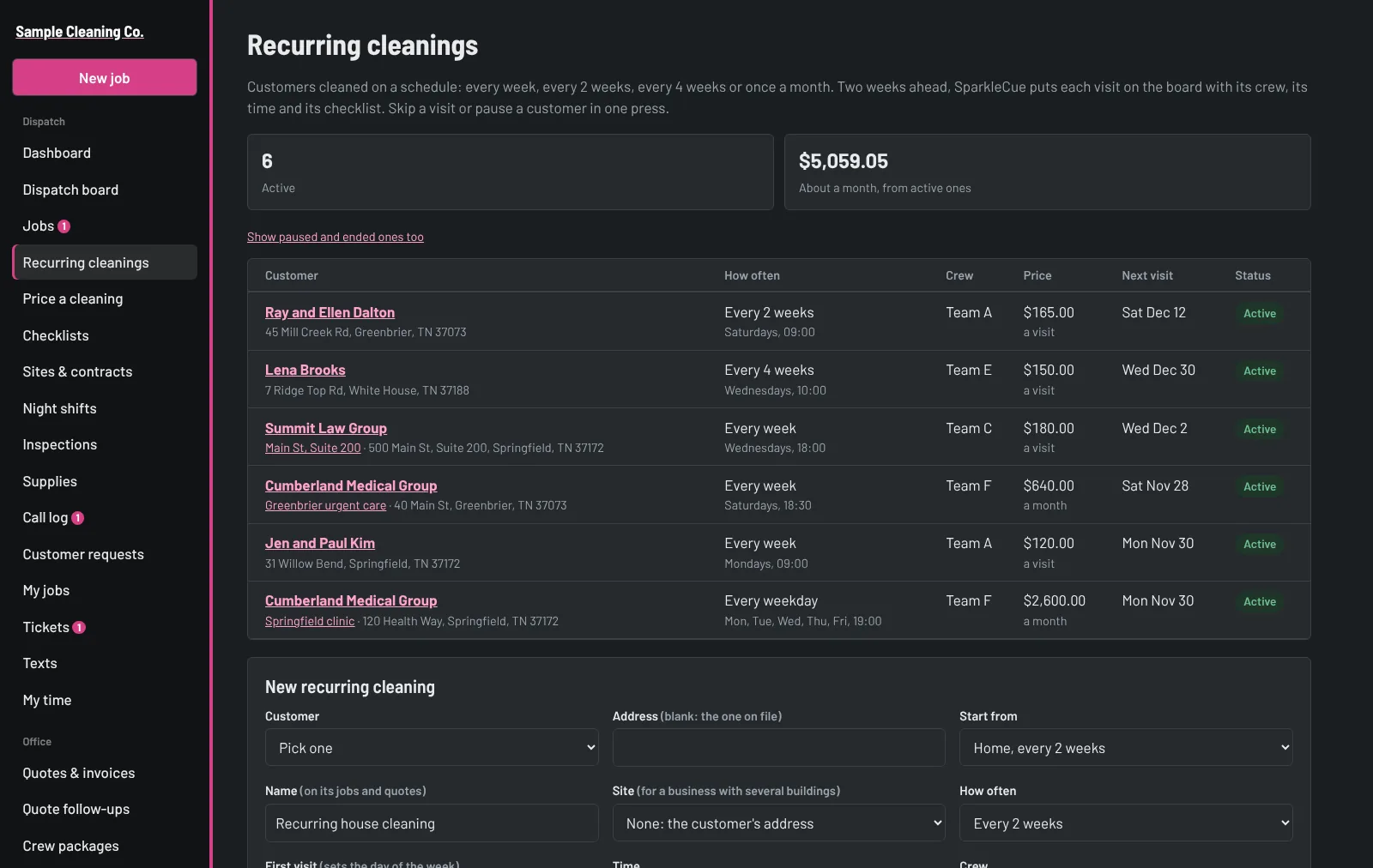
Every week, every 2 weeks, every 4 weeks or once a month. Each visit goes on the board two weeks ahead with its crew, its time and its checklist. Skip a visit in one press, or pause the schedule while they're away.
Room-by-room checklists
The crew ticks it off as they go.
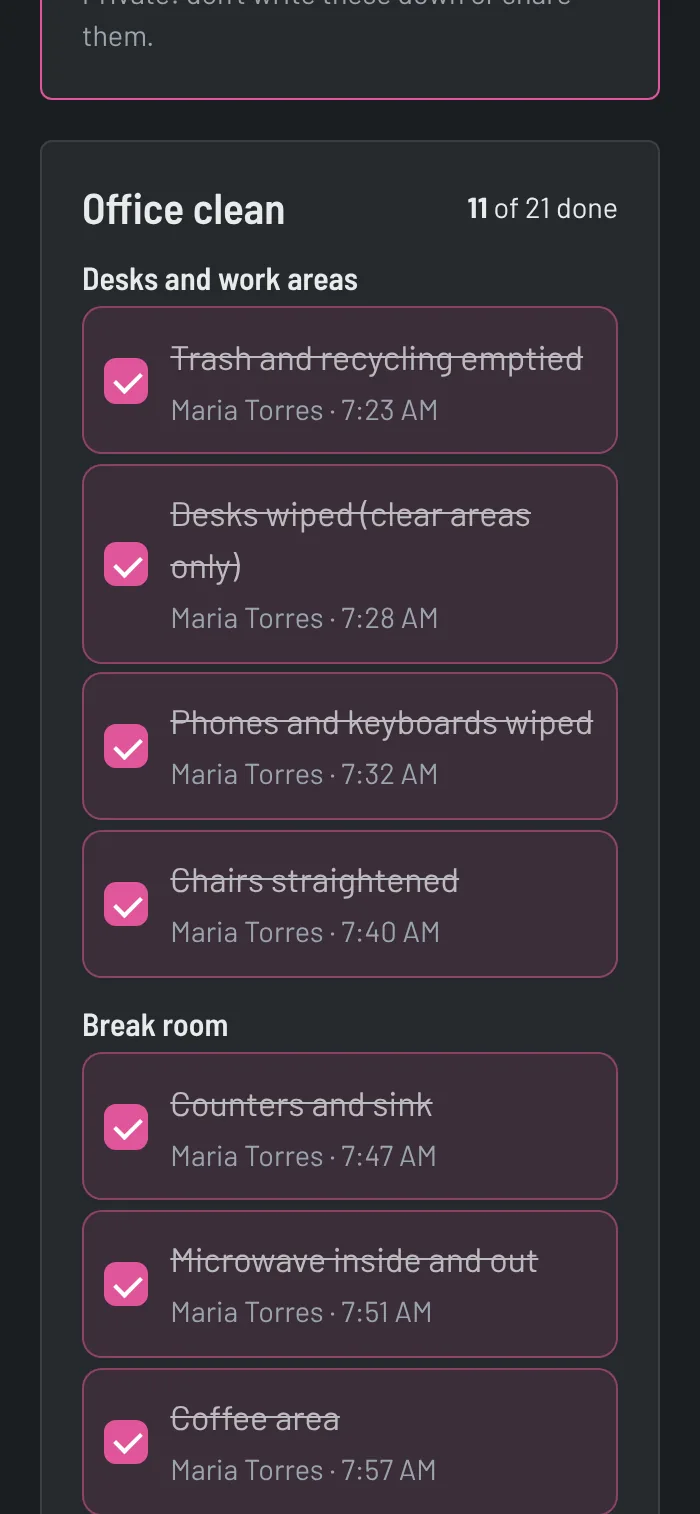
Standard, deep, move-out and office lists to start, and your own. Each task is a tap on the crew's phone, and the office sees how far along every job is.
Price a cleaning
A price in seconds, the way you charge.
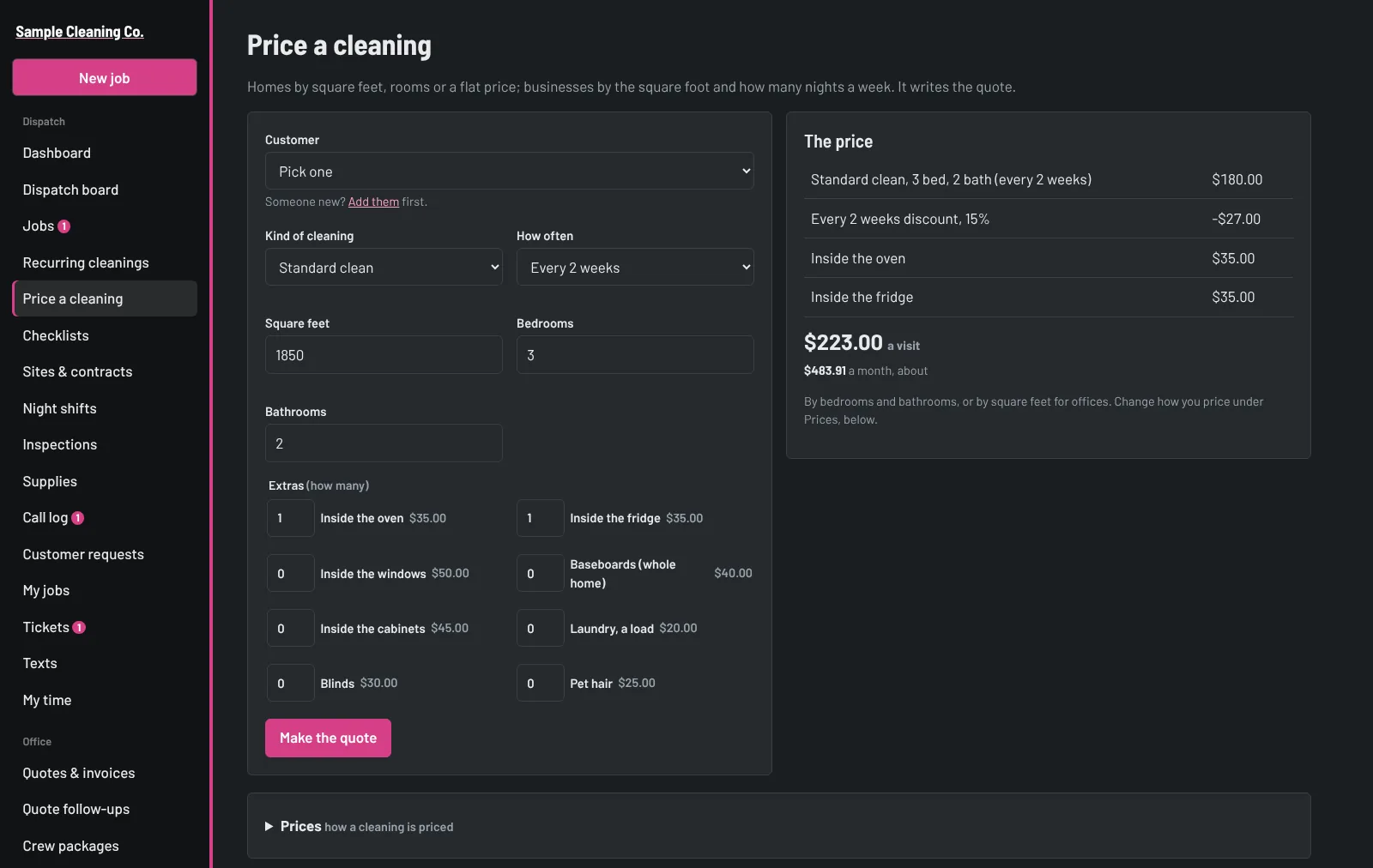
Square feet, bedrooms and bathrooms, or flat. The kind of clean, a discount for how often, and extras. One press makes the quote, and the quote becomes a recurring cleaning.
Getting in
Codes only the crew on the job can see.
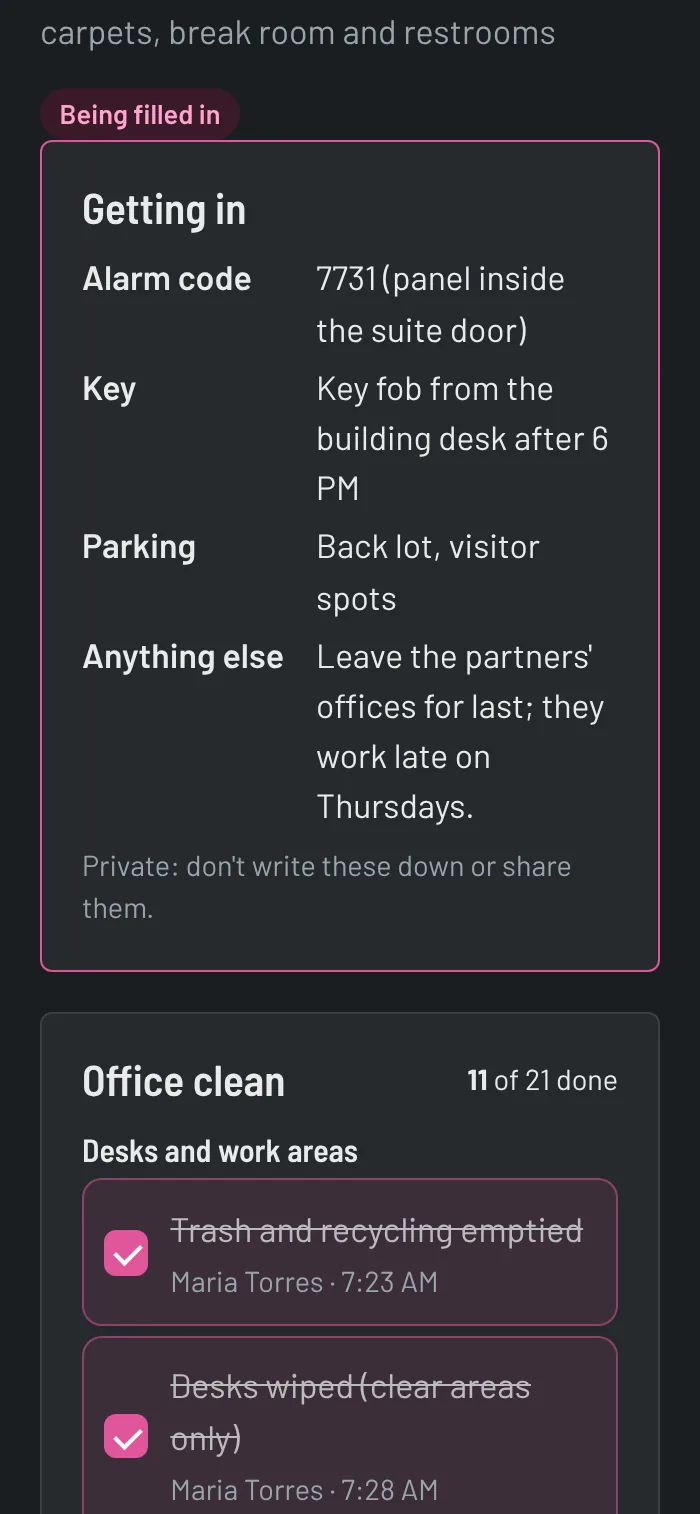
Door and alarm codes, where the key is, pets and parking, stored encrypted. The crew on that day's job sees them on the day; nobody else does.
How a job flows
From the first call to the hundredth visit.
A closer look
The office, the van, and every room.
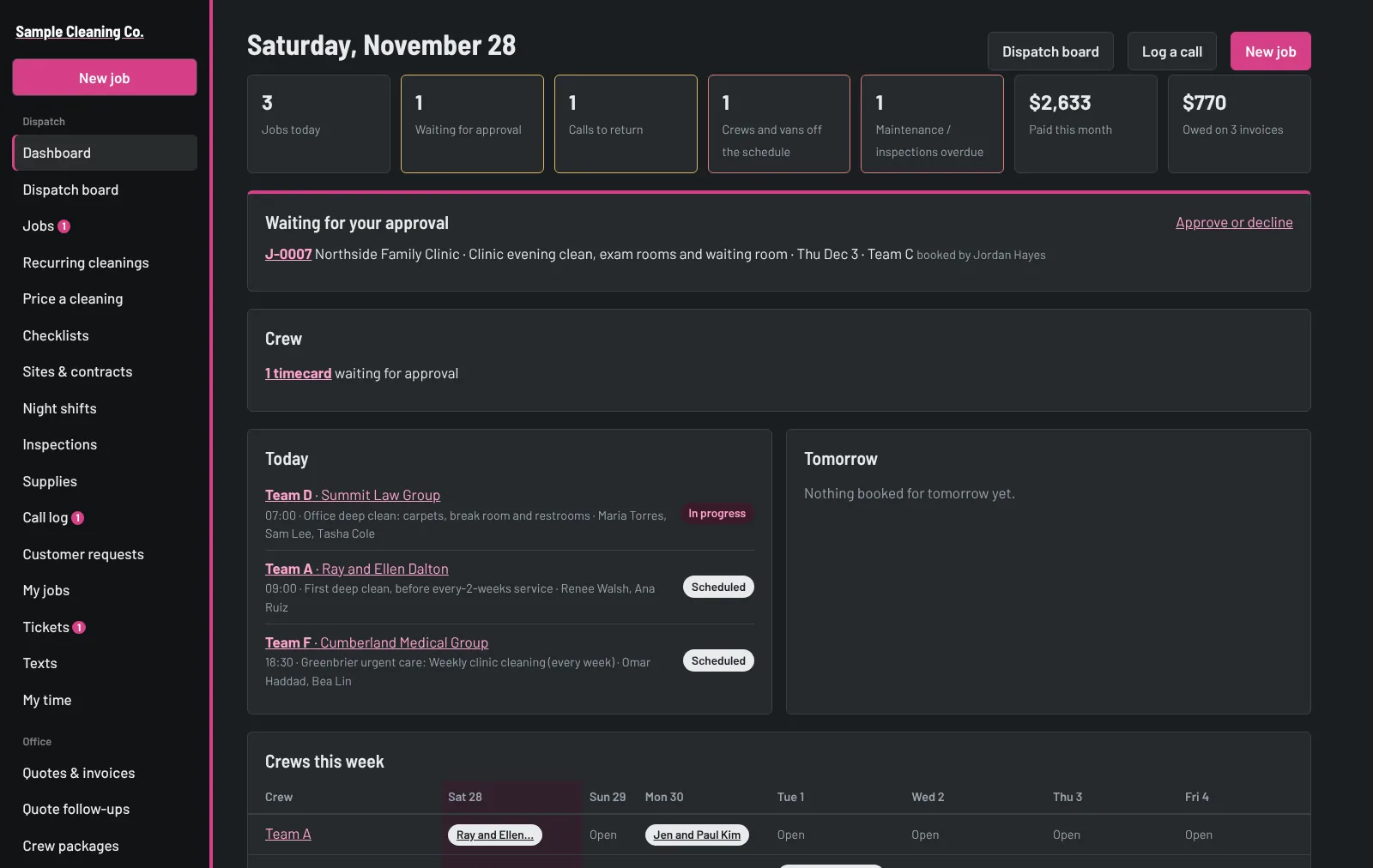
The morning view
Today's cleanings, bookings waiting for approval, what was paid this month, what customers owe, and each crew's week, on one page.
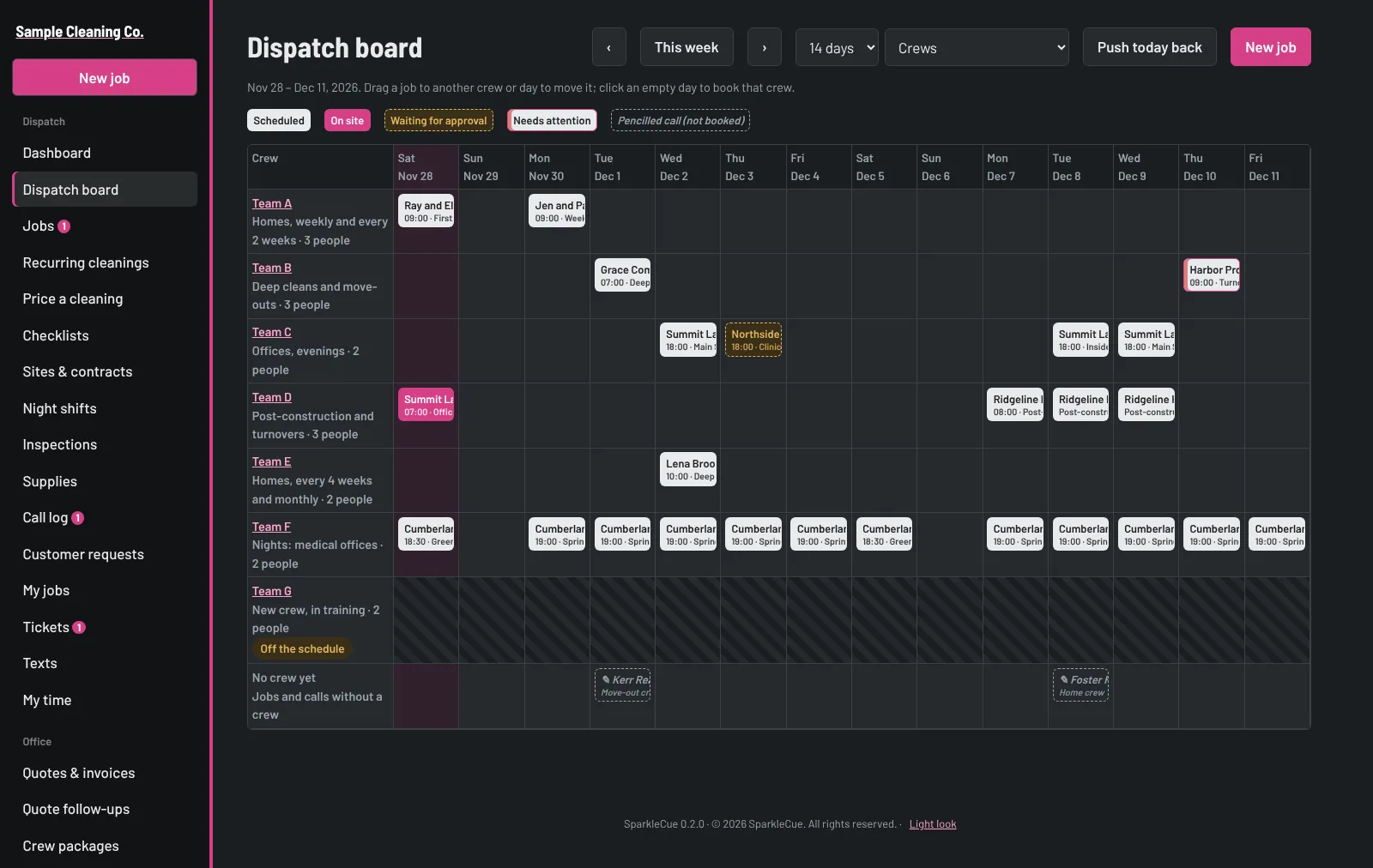
The board
Every crew has a row and every cleaning is a bar on its day. Drag it to another crew or day.
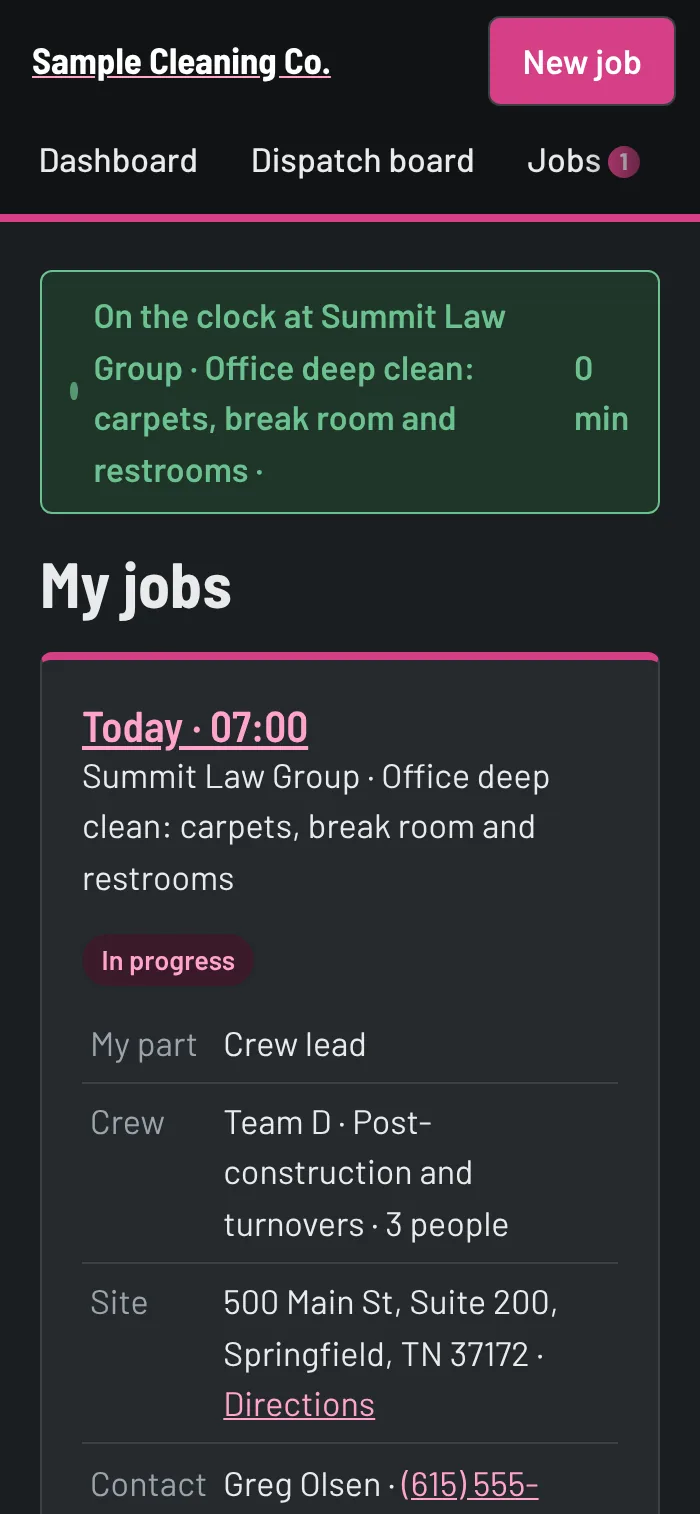
On the crew lead's phone
Today's jobs, the address with directions, the contact, who's on it, and the clock, in their pocket.
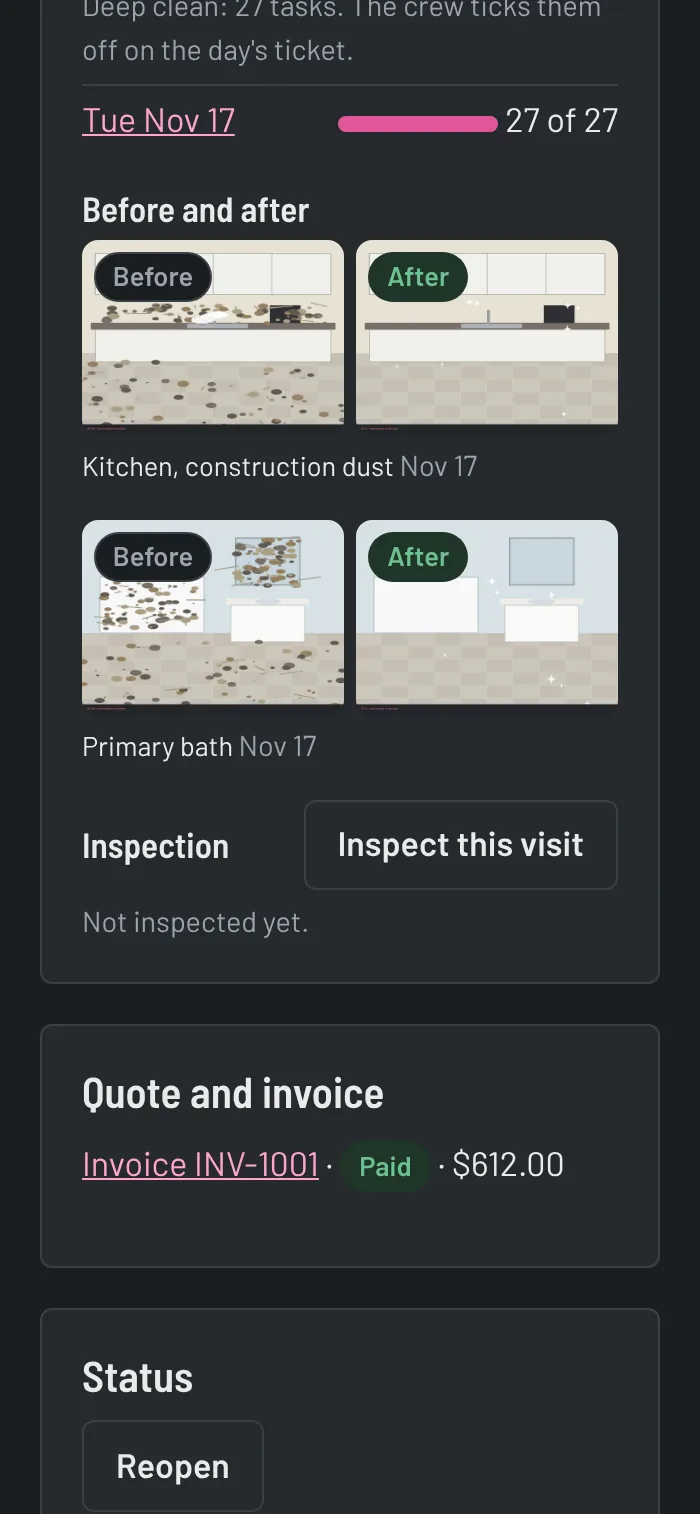
Before and after
Every photo from the job marked before or after, side by side for the office and the customer.
Everything in the plan
Built for how cleaning companies work.
Each part can be turned off if your company doesn't need it.
Homes and offices
House cleaning and office cleaning on one board, each with its own checklists and prices.
Recurring cleanings
Every week, every 2 weeks, every 4 weeks or monthly, made into jobs two weeks ahead.
Skip a visit
Skip one visit or pause the whole schedule; the job comes off the board and back on again.
Room checklists
Room-by-room tasks ticked off on the crew's phone, with progress for the office.
Before and after photos
Every job photo marked before or after, shown side by side.
Entry notes
Door and alarm codes, keys, pets and parking, encrypted, shown only to that day's crew.
Price a cleaning
By square feet, bedrooms and bathrooms, or flat, with extras and a discount for how often.
Billing your way
Each visit invoiced when it's done, or offices billed once a month.
The board
Every crew, every day. Drag a job to another crew or day, and see double bookings at a glance.
Quotes and invoices
Customers approve quotes and pay invoices online.
Call log
Log every call, pencil a crew in without booking it, and turn the call into a job in one step.
Crew and time
Timecards with overtime, and reminders before a background check or a training runs out.
QuickBooks
Customers, invoices, and payments go to QuickBooks Online, and payments recorded there come back.
Customer portal
Customers sign in to see their visits, approve a quote, ask for an extra cleaning, and pay.
Security
Your data stays yours.
256-bit AES encryptionYour crews' licenses and cards, payroll details, and company IDs are among the most sensitive things you keep. SparkleCue protects them.
Encrypted sensitive details
Driver's license, CDL and medical card numbers, certifications and their card photos, payroll details, tax IDs, and DOT numbers are stored with 256-bit AES encryption.
HTTPS everywhere
Everything between your phones, your office, and SparkleCue travels over HTTPS.
Never sold
We never sell your data. It only goes to services you turn on, like maps, texting, or payments, and only what they need to do the job.
The right people only
Role-based access means coworkers see who's certified, while only managers see the cards, numbers, pay, and payroll.
Your own space
Your company has its own address and its own separate database and files. No other company can reach them.
Take it or delete it
Export everything (every record and every file) any time, or delete it all. Yours to keep, even if you leave.
Pricing
One plan, for the whole crew.
The office, crew leads, and cleaners all sign in. Your customers' portal sign-ins don't count toward your users.
No setup fee, and we bring your data over from your current system free for up to 100 customer records. Bigger data moves, and changes made just for your company, are quoted separately.
Bigger team, or questions? Send us a note or email [email protected].
or $850 a year, saving $50
- Up to 5 users
- Customer Portal included: your customers' logins never count as users
- Recurring cleanings, room checklists, entry notes, and before and after photos
- Estimates and invoices, paid online
- Your own address: yourcompany.sparklecue.com
- Runs in your browser and on any phone
- Updates included
- No setup fee
- Free data move up to 100 customers
Sign up
Start with 7 days free.
Fill this in, then subscribe with PayPal (a PayPal account or a card through PayPal). The first 7 days are free; then it's $75 a month for up to 5 users, or $850 if you pay for a year at a time, until you cancel.
- Your SparkleCue is ready about a minute after PayPal, at yourcompany.sparklecue.com.
- Your sign-in comes by email. Add your crew, crews, and customers, or reply and we'll move your customer records over free (up to 100).
- No setup fee, no contract.
Nothing is charged for 7 days. By subscribing you agree to the Terms and the Privacy Policy. PayPal then charges the plan's price each month (or each year, on a yearly plan) until you cancel, any time, from the app (Settings, License, Subscription) or your PayPal account. Payments go to Nashville Power Services, LLC, the name on your PayPal receipt and bank statement.
You're in.
Getting started
From first look to your first booked job.
- Try the demoOpen the demo and take the tour. Set up a recurring cleaning, price a house, tick off a room checklist on a crew phone, and see how the crew gets in, with a made-up cleaning company.
- Tell us about your companySend the form below with your company and your crews. We'll answer your questions and set up your SparkleCue.
- Get your own addressYour company gets yourcompany.sparklecue.com and an admin sign-in. Add your people, and each one signs in from any browser or phone.
- Set your prices and goPut in your crews, set what you charge (by square feet, by bedrooms and bathrooms, or flat) and your extras, and put your regular customers on their schedules. Want us to bring over your customers from what you use now? Ask us.
Is it for house cleaning or commercial cleaning?
Both, or either. When you set up, you pick mostly homes, mostly businesses, or both, and SparkleCue sets the menu, the prices and the checklists to match. Homes get recurring visits, room checklists, pets and entry notes. Businesses get sites under one client, nightly schedules, fixed monthly contracts, night shifts, keys and fobs, inspections and supplies. Change it any time in Settings.
Can one client have several buildings?
Yes. Each building is a site with its own address, schedule, after-hours window, alarm and door codes, keys and fobs, supplies and inspections, and its own monthly bill.
Is there a setup fee?
No. Setting up your company's SparkleCue is included, and so is bringing your data over for up to 100 customer records. Bigger data moves, and changes made just for your company, are quoted before any work starts.
How much does it cost?
$75 a month for up to 5 users: the office, crew leads and cleaners. Your customers' portal sign-ins don't count toward your users. Need more? Ask us. Or pay for a year at a time: $850 a year.
How do recurring cleanings work?
Pick the customer, how often (every week, every 2 weeks, every 4 weeks or once a month), the first visit, the crew and the price. SparkleCue puts each visit on the board two weeks ahead with its crew, its time and its checklist, so nobody keeps a list of who's due. Skip a visit when they're away, or pause the whole schedule.
How is a visit billed?
Either way you like: each visit's price is ready to invoice when the visit is done, or offices get one bill a month for that month's visits. Nothing is charged on its own; the office still sends every invoice.
How do I price a cleaning?
By square feet, by bedrooms and bathrooms, or a flat price, with the kind of clean (standard, deep, move-out, office), a discount for how often they want it, and extras like the inside of the oven or the fridge. You set every number. One press turns the price into a quote, and the quote into a recurring cleaning.
What are the room checklists?
A list of rooms with the tasks in each: standard, deep, move-out and office lists to start, and any you add. The crew ticks each task off on their phone as they go, and the office sees how far along they are.
Where do the door and alarm codes go?
Each customer has their entry notes: the door code, the alarm code, where the key is, pets and parking. Codes are stored encrypted, and only the office and the crew on that day's job see them, on that day.
Can the crew take before and after photos?
Yes. Each photo from the job is marked before or after, and the job shows them side by side for the office and the customer.
What does the crew see?
Their jobs for the day with the address, directions, the contact, who they're working with and how to get in. They clock in, tick off the checklist, add photos, and get the visit signed off on the phone. Cleaners don't see prices.
How do I cancel?
Any time, from SparkleCue itself: Settings, License, Subscription, Cancel subscription (or in your PayPal account). There's no contract and no fee, and SparkleCue keeps working through what you've paid for. Then we keep your data for 60 days so you can download it, and delete it after that.
Do we have to install anything?
No. SparkleCue runs in the browser on computers, tablets, and phones. Your crew can add it to their phone's home screen like an app.
Does it work with QuickBooks?
Yes, QuickBooks Online. SparkleCue sends your customers, invoices, and payments to QuickBooks, and payments recorded in QuickBooks show up on the invoice in SparkleCue.
How can our customers pay?
Online from the invoice by card or from their bank, through Stripe, PayPal, Square, or Zelle. You turn on the ones you want. Checks and cash are recorded by hand.
Is our data safe?
Door and alarm codes, keys, payroll details and tax IDs are stored with 256-bit AES encryption, everything travels over HTTPS, and your company has its own separate database and files. We never sell your data.
Can we get our data out?
Any time. An admin can download everything, every record and every uploaded file, from Settings, License, even if you stop using SparkleCue. You can also delete it all.
How do we get help?
Email [email protected]. Include your company's SparkleCue address and what you were doing, and we'll get back to you.
Is the demo real?
It's the real SparkleCue with a made-up cleaning company. Everything works except email and texts, and it resets every night, so try anything. The sample before and after photos are drawings, not real homes.
Contact
Get SparkleCue, or ask us anything.
Tell us about your company and your crews, and we'll get back to you by email. No setup fee.
Support for customers: [email protected]
See it with a sample cleaning company.
No sign-up. Set up a recurring cleaning, price a house, and tick off a checklist on the crew's phone. Everything resets every night.